
An End of Month Conflict (EOM) happens when your old-month and new-month schedules overlap or create a legality. If you have vacation in the new bid month, you are not subject to an EOM adjustment and generally do not need to take action.
When Are You Subject to Adjustment?
If the credit-time difference between the carryover trip from the old month and the conflicting trip(s) in the new month is greater than 3:00, you may be subject to adjustment.
You have two opportunities to resolve the conflict yourself before Crew Scheduling may adjust your schedule for you.
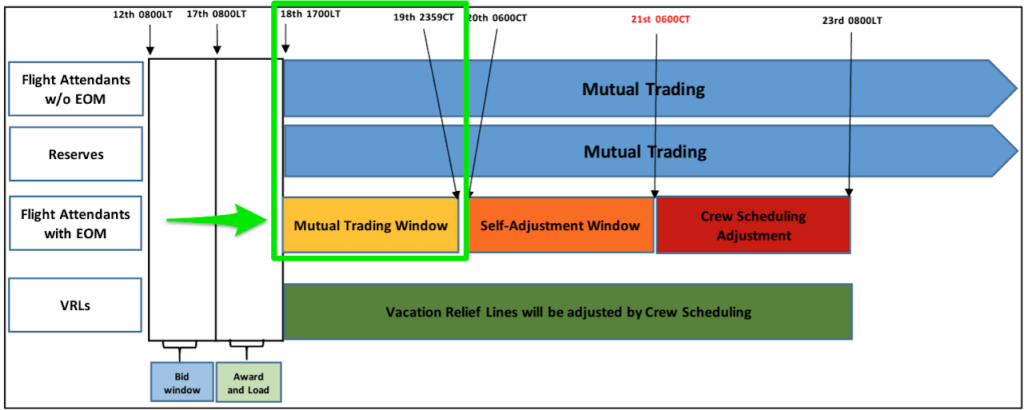
Phase 1: Mutual Trade Window
18th at 1700 Local Time through the 19th at 2359 Central Time
This is your first opportunity to resolve the conflict by trading the old-month or new-month conflicting pairing with another Flight Attendant.
If the conflict is not resolved by the end of this window, your line may be blocked from additional mutual trading until the conflict is resolved.
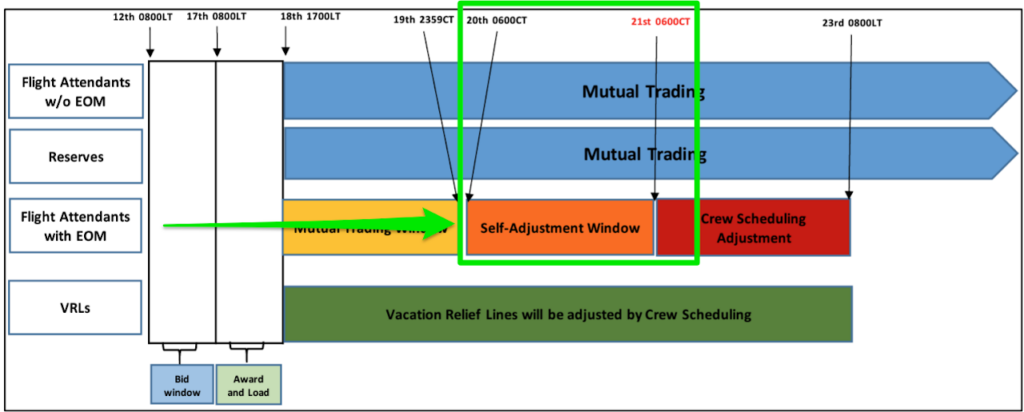
Phase 2: Self Adjustment
20th at 0600 Central Time through the 21st at 0600 Central Time
If the conflict remains unresolved, use:
CCS → Schedule → Self Adjustment
The system will display available legal solutions. If no solutions appear or you experience an error, take screenshots and contact Crew Scheduling immediately.
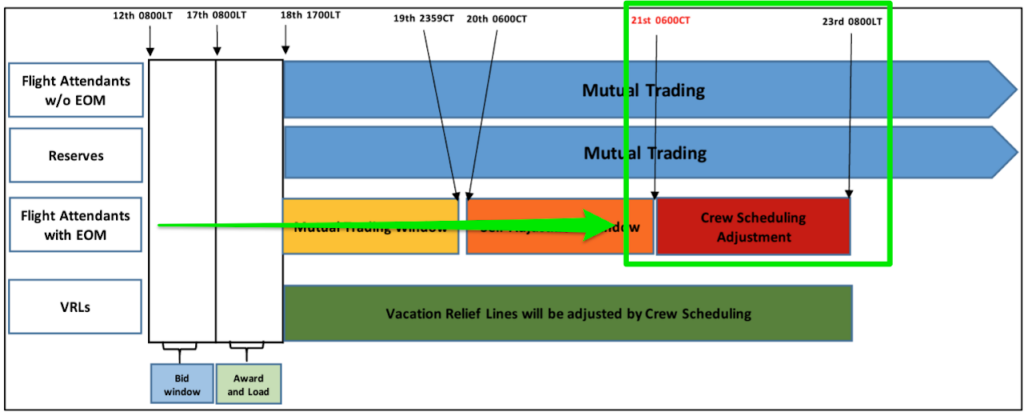
Phase 3: Crew Scheduling Adjustment
21st at 0600 Central Time through the 23rd at 0800 Local Time
If you do not resolve the conflict during the Mutual Trade or Self Adjustment windows, Crew Scheduling may adjust your schedule without your input.
They may assign a legal pairing on any available day in the month, including days that were originally scheduled as days off.
Reserve Adjustment Days
If Crew Scheduling cannot find a pairing to resolve the conflict, Reserve Adjustment (RA) Days may be placed in your schedule unless you previously opted out.
On an RA Day:
- Check your Master Schedule at 1930 the night before.
- You may be assigned a pairing or released.
- You cannot be assigned Ready Reserve or Airport Standby.
- If you are neither assigned nor released by 1930, take a screenshot for your records and you are free from obligation for that RA Day.
You may opt out of future RA Days in:
CCS → General Settings → Adjustment Request → Do Not Use RA Days
Key Takeaway
Resolve your EOM conflict during the Mutual Trade or Self Adjustment windows whenever possible.
If you wait, Crew Scheduling has much broader authority to adjust your schedule anywhere in the month.
Questions?
AFA Council 21 Main Office: (703) 260-0051